

For most Windows 11 laptops, the antivirus to start with is the one already installed, Microsoft Defender Antivirus. It scored 6 out of 6 for protection in AV-TEST’s August 2026 Windows 11 round, so a slow laptop is a reason to rule out scans and duplicate security software before you go shopping for a lightweight antivirus.
Most of the machines on my bench were Dell, HP and Lenovo laptops. When one came in crawling, I opened Task Manager before I opened anything else.
What Microsoft Defender already covers on Windows 11
Defender ships inside Windows 10 and 11 and runs from the Windows Security app. Microsoft’s support page lists it there next to Windows Firewall and Smart App Control, and says protection is on from the moment the device starts.
AV-TEST’s August 2026 round tested 15 home user products at default settings. Defender scored 6 for protection and 6 for usability, and all 15 products earned the TOP PRODUCT mark, Defender included.
So do you still need a separate antivirus in 2026? Something has to scan, and on Windows 11 it already does. I leave Defender on for most home laptops and only change that when a check shows it’s the problem. Microsoft also says that if you pause real-time protection, it turns itself back on soon, which is one less thing to forget.
Is the antivirus really what’s slowing the laptop?
Open Task Manager and sort the Processes tab by CPU. If Antimalware Service Executable sits near the top during a scan and drops back afterward, the antivirus is doing its job. If it stays busy for hours, or something else is pinned, the cause is somewhere else.
Press Ctrl+Shift+Esc, pick the Processes tab and click the CPU column. Microsoft lists Antimalware Service Executable, which shows as MsMpEng.exe on the Details tab, as the Defender engine. Another vendor’s scanner will carry that vendor’s name.
Next, find out whether a scan is running. Microsoft says a full scan can take a few hours or days, depending on how much data it covers, and it recommends quick scans for scheduled and on-demand use. Microsoft also documents that manual scans ignore the maximum CPU load setting, so a full scan you started yourself takes what it can get.
Laptops have one more wrinkle. If the machine is unplugged during a scheduled full scan, Microsoft says Defender stops the scan and runs it again at the next scheduled time. A laptop that drags at the same hour every week may be running into that schedule.
To test the scanner directly, open Windows Security, go to Virus & threat protection, then Manage settings, and switch Real-time protection off. While it’s off, Microsoft notes, files you open or download aren’t scanned. Keep the browser closed and download nothing. If the laptop snaps back in that window, the scanner is the cause. If nothing changes, turn it back on and stop blaming it.
Then look for a second scanner under Settings, Apps, Installed apps. Windows is built to prevent two from fighting: Microsoft’s compatibility documentation says Defender switches itself off automatically on Windows 10 and 11 when another antivirus is the primary product. The exception is a disabled Windows Security Center service. Then Defender can’t see the other product and stays active, both try to provide active protection, and Microsoft says that hurts performance and isn’t supported. I’d treat two third-party scanners the same way and remove one.
Owners disagree about Defender’s weight, and two r/antivirus comments show it:
“The lightest one I’ve used by far is ESET Home Premium. Defender slows my PC down to a crawl, Bitdefender is heavier and continually reinstalls its own VPN app that I don’t need. Don’t even look at Norton or Avast/AVG”
– r/antivirus, September 2026 (6 upvotes)
“Windows defender for automatic protection Malwarebytes free version for deep occasional scanning Don’t buy an antivirus, you don’t need one. Windows defender is good enough”
– r/antivirus, September 2026 (4 upvotes)
If nothing security-related is busy and the CPU, disk or memory column is still pinned, the antivirus isn’t the problem. That’s a startup, storage or hardware job, and swapping antivirus won’t touch it.

What independent tests say about lightweight antivirus
Two labs publish speed results for consumer Windows antivirus, and they measure it differently. AV-Comparatives and AV-TEST both place Defender slightly off the top of their speed tables rather than at the bottom.
AV-Comparatives’ Performance Test from April 2026 covered 20 consumer products at default settings on an up-to-date Windows 11 machine with an Intel Core i3, 8 GB of RAM and an SSD, which the report itself calls low-end. It timed file copying, archiving, application installs and launches, downloads and website loading. Then it ran the UL Procyon Office Productivity benchmark, where a PC with no security software scores 100.
Each product gets an impact score, and lower means lighter. The scores run from 3.3 to 33.4. Microsoft Defender Antivirus 4.18 scored 12.9, between Panda Dome Advanced at 11.1 and Malwarebytes Premium at 17.6.
| Product tested (selected rows) | Impact score, lower is lighter |
|---|---|
| McAfee Total Protection | 3.3 |
| ESET HOME Security Essential | 4.2 |
| Norton Antivirus Plus | 5.3 |
| Avast Free Antivirus and AVG AntiVirus Free (tied) | 5.5 |
| Bitdefender Total Security | 9.6 |
| Microsoft Defender Antivirus | 12.9 |
| Malwarebytes Premium | 17.6 |
Kaspersky Premium scored 3.5 in the same report, and I left it out of the table on purpose. In June 2024 the Commerce Department’s Bureau of Industry and Security announced a Final Determination that bars Kaspersky Lab, Inc. from providing antivirus software in the United States or to U.S. persons.
Now read Defender’s row carefully. Its Office benchmark score was 97.1 against the 100 baseline, the second highest in the report, behind only Malwarebytes Premium at 97.4. Its AV-Comparatives subtest score was 80, while the leading group of eight products scored 90. The lost points came from the timed subtests, not from the Office benchmark.
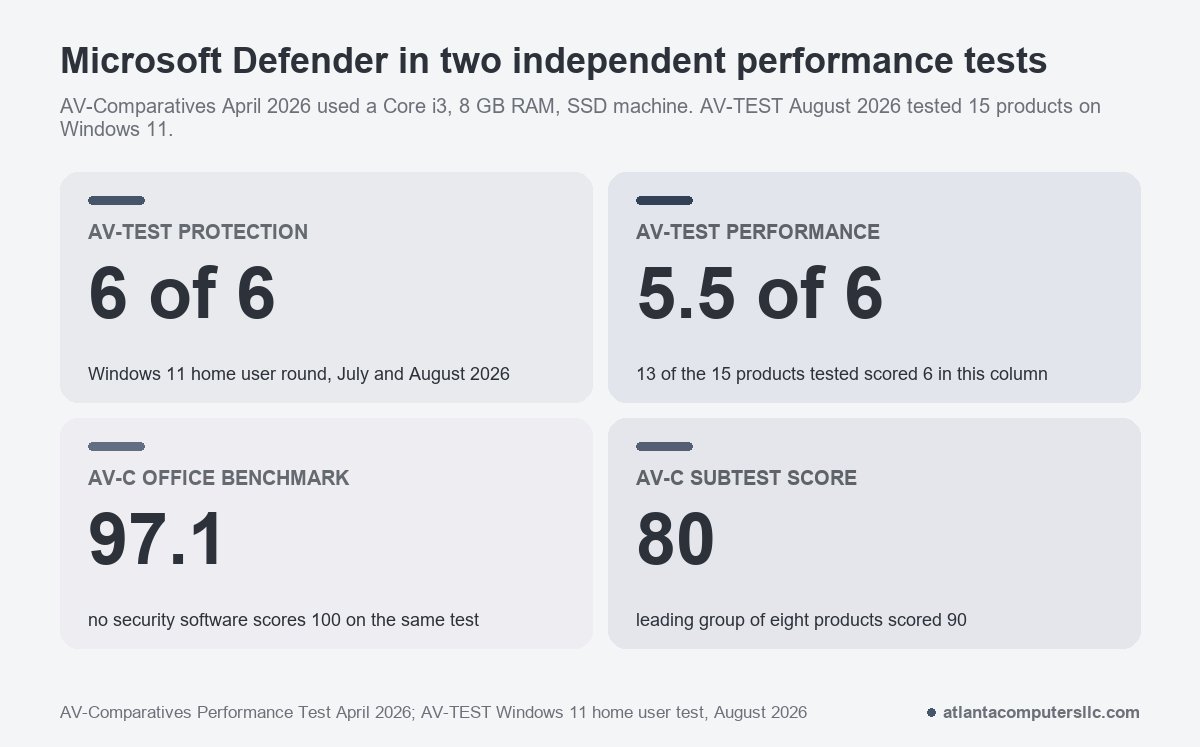
AV-TEST’s Windows 11 round for home users ran in July and August 2026 on 15 products. Each category tops out at 6 points. Thirteen products scored 6 in the Performance column. Microsoft Defender Antivirus (Consumer) 4.18 and TotalAV scored 5.5.
Neither lab turns its points into seconds.
Treat the numbers as relative. AV-Comparatives says its results only indicate the impact of those exact product versions on its test machine, and it tells readers to try software on their own PCs. The performance report also says nothing about how well a product protects. Most of the editions tested are paid suites, so a free edition from the same company may behave differently. Avast Free and AVG Free are the only free ones listed besides Defender.
That caveat cuts both ways for the Reddit comment above. Norton and Avast/AVG both ranked ahead of Defender on the lab’s Core i3 machine, yet that commenter had the opposite experience. One drive, one RAM size and one set of startup items can flip a ranking. The test that settles it is the Task Manager check from the section above, run before and after any change.
Switching without ending up with two scanners
Switch only if the checks pointed at the scanner, or if you want something Defender doesn’t offer. Install one product, and let Windows hand over: Microsoft documents that Defender goes into disabled mode on its own once another antivirus is the primary one.
Don’t disable the Windows Security Center service to force it. Microsoft’s warning applies directly. With that service off, Defender stays active beside the new product and both scan.
When you remove an old product, use its own uninstaller from Installed apps and restart. Then repeat the Task Manager check. If the laptop isn’t faster, the antivirus wasn’t the cause, and the change bought you nothing.
When the antivirus is not the problem
Browser homepages that changed, programs you didn’t install, or Windows Security that won’t open point at an infection, not at scan load. That’s a cleanup job, covered in how to remove a virus from a laptop.
Stop and take it to a shop if Task Manager shows the disk pinned at the same moment the laptop clicks, stutters or freezes with no scan running. Back up what you can first.