
An Xbox controller blinking is the Xbox button light reporting a state: it’s searching for a device, it’s low on power, or the link keeps dropping. Microsoft’s support pages tie each pattern to a different cause, so match yours first, then run only the fix that goes with it.
Pairing steps have their own guide: Xbox controller not connecting covers the Pair button and the cable test. Below, each blink pattern gets its own fix.
What does Xbox controller blinking mean?
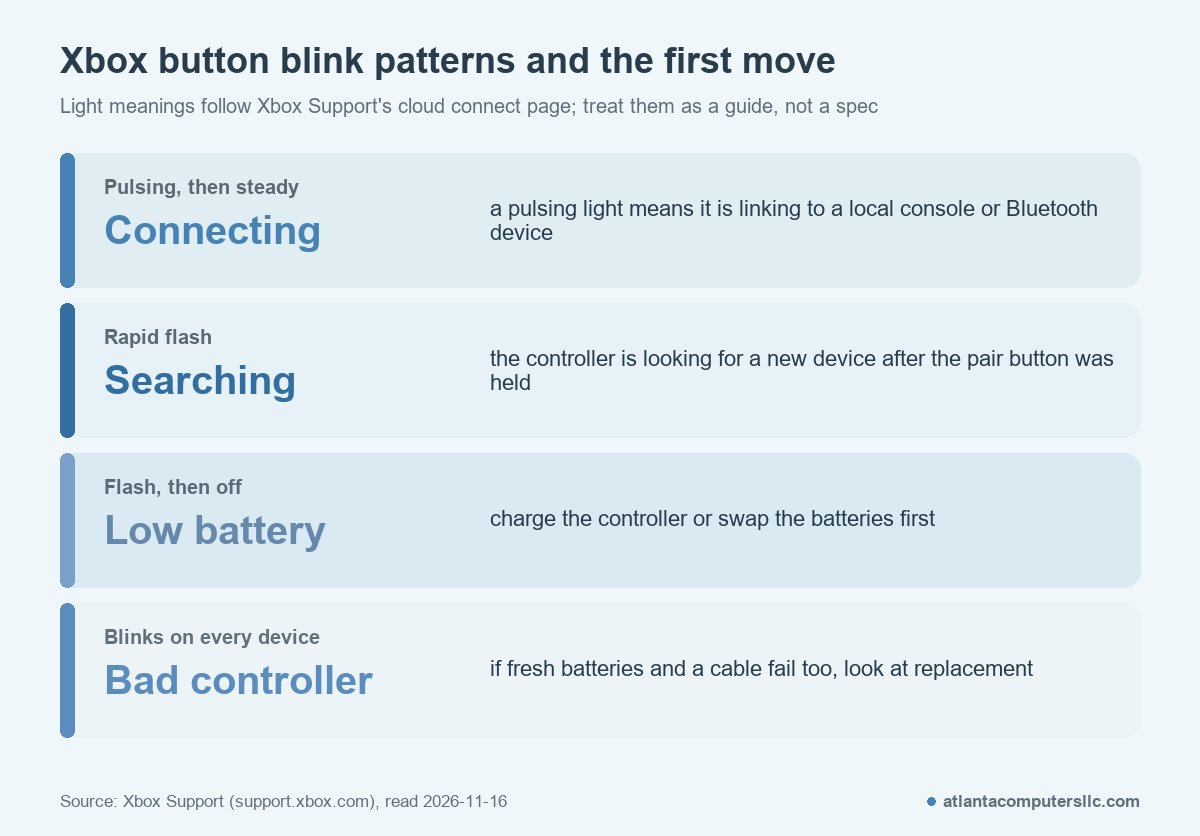
Blinking is normal at two moments and a warning at others. Microsoft’s PC pairing page says the Xbox button flashes when you turn the controller on, flashes more rapidly after you hold the Pair button because it is searching, and stays lit once connected. Anything that keeps flashing past that point hasn’t finished connecting.
Four patterns cover most cases: a slow flash on power-up, a rapid flash after pairing, a flash that ends with the light going out, and a flash that never settles. Pick the section that matches what you see.
Blinks slowly when you turn it on
How to confirm: you pressed the Xbox button and the light flashes while the controller looks for its console. Microsoft says the button flashes when you turn the controller on, and that when it stays lit, the controller is connected.
First step: wait a few seconds. If it never goes steady, check the batteries. Microsoft’s console pairing page says to check the batteries if the controller doesn’t turn on, and to make sure rechargeable ones are charged. Its troubleshooting page adds a detail worth acting on: replace the batteries with fresh ones or fully recharge the pack even if the controller still has power, because low batteries can cause connection and functionality issues.
If that fails: press and hold the Xbox button for 5 to 10 seconds until the controller turns off, wait a few seconds, then hold it again. If it still flashes, run the pairing steps in the Xbox controller not connecting guide.
Blinks fast after you press Pair
How to confirm: you held the Pair button and the light flashes more rapidly than before. Microsoft’s PC pairing page says that means the controller is searching, for the Xbox Wireless Adapter or, over Bluetooth, for a PC. The console page says the button flashes a few times while it searches for a console.
First step: leave it alone. Searching is the expected state, and the light stays lit once the link is made. On a console, press Pair within 20 seconds of turning the controller on, as Microsoft’s console page describes.
If it keeps searching, the controller can’t find the console or PC. Try the cable. Microsoft says a controller plugged in with a micro-USB or USB-C cable should light up and work right away. Use a cable that supports data transfer, because charge-only cables won’t pass a signal.
Blinks, then shuts off
How to confirm: the light flashes, then goes out on its own. On the cloud connect page, which covers the Xbox Nano Controller, Microsoft lists “Flashes then turns off” as low battery and says to charge the controller.
First step: fresh batteries or a full charge, then the 5 to 10 second power cycle described above. Microsoft’s troubleshooting page also has a console power cycle: hold the Xbox button on the front of the console for about 10 seconds, and once it powers down, unplug the power cable for 30 seconds before plugging it back in.
When it counts as hardware: Microsoft says that if the controller won’t power on even when connected with a USB cable, it needs to be replaced. If you’ve updated the firmware and it still won’t power on without the cable, same verdict.
Blinks and never goes steady
How to confirm: the light keeps flashing minutes after you turned on or paired, and the controller never connects. Start with the firmware, since Microsoft lists it in the troubleshooting steps. On a console, open the guide and go to Profile and system, then Settings, Devices and connections, then Controllers and headsets, and select the three dots under the controller to check its firmware status. On a PC, install the Xbox Accessories app from the Microsoft Store and connect the controller while the app is open.
Then run the wired test. Connect the controller with a data-capable USB-C cable (or USB to micro-USB for Xbox One controllers). The decision rule comes straight from Microsoft’s page.
- Works wired but not wirelessly: the controller’s core is fine, so look at batteries, firmware and the console’s wireless side.
- Doesn’t work wired: try another cable and another port or device. If the cable and port are verified and the controller still fails, Microsoft says the controller needs to be replaced.
For the Pair-button route on a PC, see Microsoft’s PC pairing page.
Blinks and reconnects in the middle of a game
Players describe this pattern most often in the threads. One r/XboxSupport poster put it this way.
“Has anyone else dealt with this issue? About 2 months ago my controller started doing this every once in an awhile. It will just turn off and do this blink then turn back on. This has been frustrating while gaming, I’ve looked up so many things it could be but I got nothing. I tried syncing my controller to my pc once so I don’t know if that was an issue. Seems like both of my controllers do this though. Any help is appreciated!”
– r/XboxSupport, August 2026 (167 upvotes)
Two controllers failing the same way points away from one worn pad and toward the console, the room or the connection. That’s an inference from one post, not a diagnosis.
A reply in r/XboxController suggests a different test.
“Take the batteries out, turn off the xbox. Plug it in via USB C, try and turn it on with the controller. If that doesn’t work, its most likely a hardware issue or your consoles wireless receiver is locked.”
– r/XboxController (5 upvotes)
That takes the battery and the radio out of the picture and shows whether a wired controller still responds. The reply goes on to describe resetting the console’s wireless receiver. Get the console steps from Xbox Support, not from a forum paste.
How do you tell a bad controller from a bad console?
Test the controller somewhere else. If it blinks the same way on a second console or a PC with fresh batteries and a data cable, the controller is the likely fault. If it works everywhere except one console, look at that console and its wireless setup.
Other systems follow the same split, and the PS5 controller not connecting guide uses it too. Change one side, keep the other, and the fault follows the part that’s actually broken.
When the cable and port check out and the controller still fails, Microsoft’s controller troubleshooting page sends you to its controller replacement request. Check the warranty before you pay for a new one.