
Last updated: October 27, 2026
Of all the iPhone Duo problems reported so far, one is confirmed: a crack in the inner display along the hinge. Apple told MacRumors and 9to5Mac that it is “aware of an issue impacting the inner display on a small number of iPhone Duo units,” and says affected owners should contact AppleCare for a replacement.
Each of the iPhone Duo problems below is sorted by how well it is documented: confirmed by Apple, reported but unexplained, or a design trade-off that is not a fault. New issues get their own section once a reliable source covers them, and the update log at the end shows what changed.
iPhone Duo problems at a glance
| What you notice | Where it stands | Your next move |
|---|---|---|
| A bright line or crack along the fold of the inner display | Apple acknowledges an issue on a small number of units (statement to MacRumors and 9to5Mac, October 26) | Contact AppleCare for a replacement |
| Hinge noise, a loose or stiff feel, or a phone that will not close fully | Apple publishes a hinge troubleshooting article and does not name a cause | Run Apple’s five hinge checks, then Apple service |
| A crunchy hinge after sand or dust | Apple’s handling guide says to keep sand and grit away from the hinge | Look at the hinge before you open the phone |
| A replacement that is slow, or a carrier that will not swap it | Reported by owners; MacRumors says in-store stock is limited | Contact AppleCare directly, per 9to5Mac |
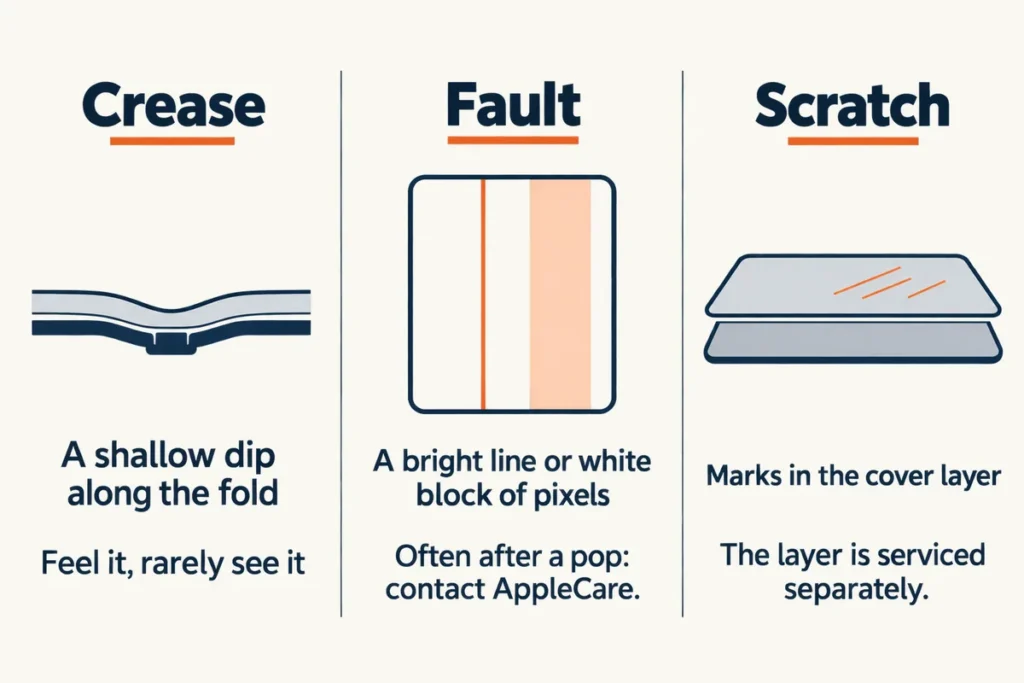
| A shallow dip where the screen folds | A crease, not a crack; iFixit says no foldable has removed it | Compare it with the bright-pixel line of a real fault |
| Apps that look small, stretched or off-center | Third-party apps are still being updated for the Duo | Update the apps and iOS |
| A warm back, a heavy body, no telephoto lens, Touch ID, a $2,000-plus price | Trade-offs reviewers list; none is a defect | Settle it inside the return window |
Inner display cracks along the hinge
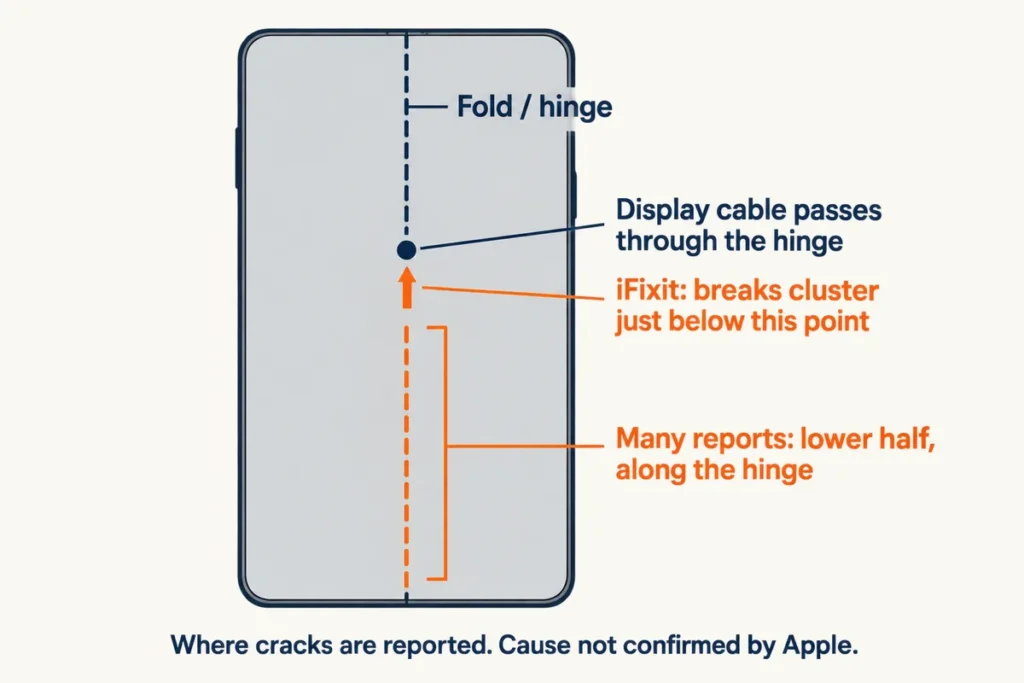
If a bright line, a glowing block of pixels or a visible crack appears along the fold, contact AppleCare. The damage is often in the lower half of the inner display along the hinge, and owners often feel a stuck spot or hear a pop just before it happens (MacRumors).
It can happen fast. One owner in Australia reported a crack after about six hours and fewer than 20 openings, with no marks beforehand (MacRumors), and a couple of owners said theirs broke during first setup (9to5Mac).
How big is the problem
Expect it to be rare, but nobody has a number. Apple calls it “a small number” of units (Apple’s statement). About ten unique cases had surfaced by October 25 (9to5Mac), and contacts at seven Apple stores had seen no broken-screen service on October 24 and one case by late that Sunday (AppleInsider). Neither figure is a failure rate.
Be careful with photos you cannot trace. Some of the crack images online are AI-generated (MacRumors), so judge scale by those store and Apple numbers, not by a photo feed.
Three theories about the cause, none confirmed
Apple has not said what causes the cracks or whether a fix is planned (MacRumors). Three explanations are circulating, and none of them changes what you should do:
- A center support bar in the hinge fails to drop far enough, so the folded screen presses down onto it; the breaks cluster just below where the display cable crosses the hinge (iFixit’s teardown simulation, offered as one possible answer).
- A hinge element shears at the spot where the crack begins, as found in one teardown after dirt and backward-folding tests (YouTuber CuriousHagi, as described by AppleInsider).
- A hinge piece sits slightly out of alignment and pokes up into the inner screen on some units (a working theory reported by 9to5Mac).
Folding technique is unsettled. Apple has given no guidance on how to fold and unfold the phone, and it is unclear whether pressing the middle of the screen to close it matters (9to5Mac). One r/iPhoneDuo commenter says they asked several owners of broken phones about it:
“People are still claiming that the broken Duos are caused by pushing your finger down on the crease. I have asked multiple broken phone posters if they did this, and they all said no.”
– r/iPhoneDuo, October 2026 (17 upvotes)
That is one person’s informal poll, not data.
What Apple says to do about a crack
Contact AppleCare for a replacement: “If users experience issues with their iPhone Duo display, they should contact AppleCare for a replacement” (Apple’s statement). You do not need AppleCare+ for this problem, and a carrier purchase goes to AppleCare directly, not to the carrier (9to5Mac).
The swap itself depends on where you bought the phone and what stock is on hand, which the replacement section below covers.
If the phone still responds, back it up first. On laptops I back up or image the drive before any repair that touches the disk, and a phone swap deserves the same habit, because the replacement starts out blank.
Hinge noise, a loose feel, or a hinge that will not close
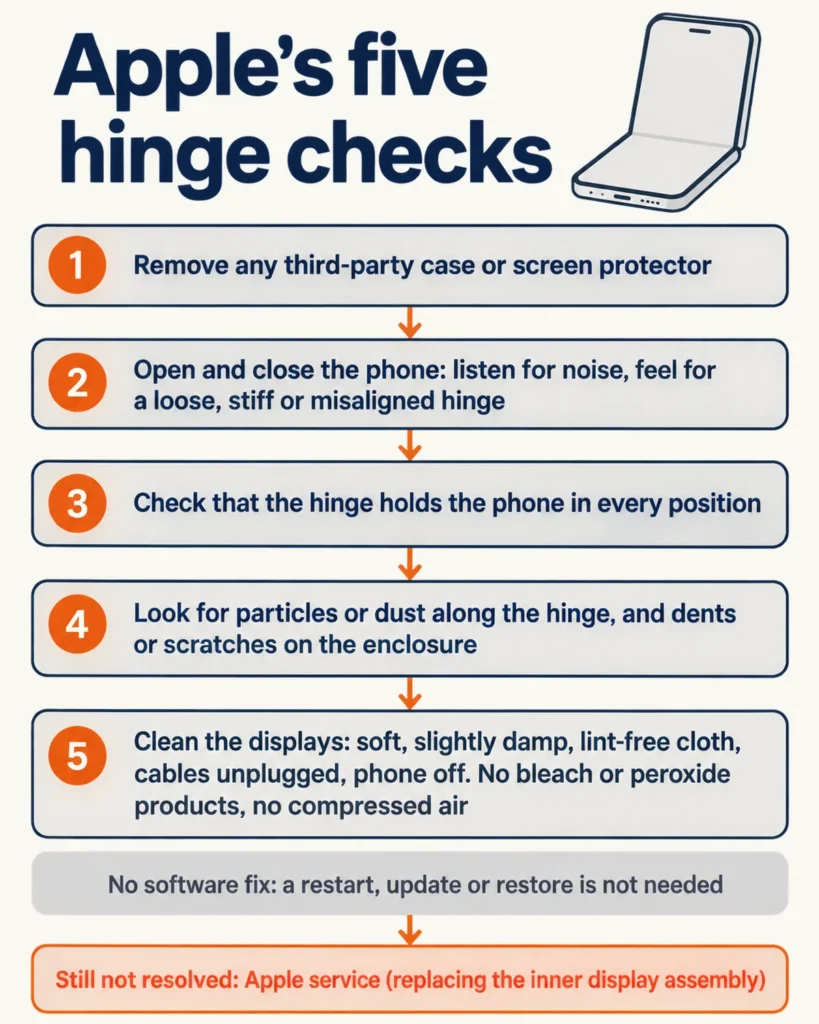
If the hinge makes unexpected noise, feels loose, will not open or close completely, looks bent or broken, or the enclosure is damaged near it, run the manual tests in Apple’s iPhone Duo Troubleshooting Hinge Issues article before anything else. They run in this order:
- Remove any third-party case or screen protector.
- Open and close the phone, noting any noise, and whether the hinge feels loose, stiff or misaligned.
- Confirm the hinge holds the phone securely in every position.
- Look for particles or dust along the hinge and for dents or scratches on the enclosure.
- Clean the displays with a soft, slightly damp, lint-free cloth, after unplugging all cables and turning the phone off. Skip products with bleach or hydrogen peroxide, keep moisture out of every opening, and do not use compressed air.
Apple states that there are no diagnostics or software remedies for hinge issues, so a restart, update or restore is not needed. If the tests do not resolve or isolate the problem, the next step is replacing the inner display assembly. That repair requires ordering parts and tools, and Apple notes it may not fix the issue.
Apple does not describe what a healthy Duo hinge sounds like, so the practical test is change. A noise, looseness or stiffness that was not there on day one is worth a call.
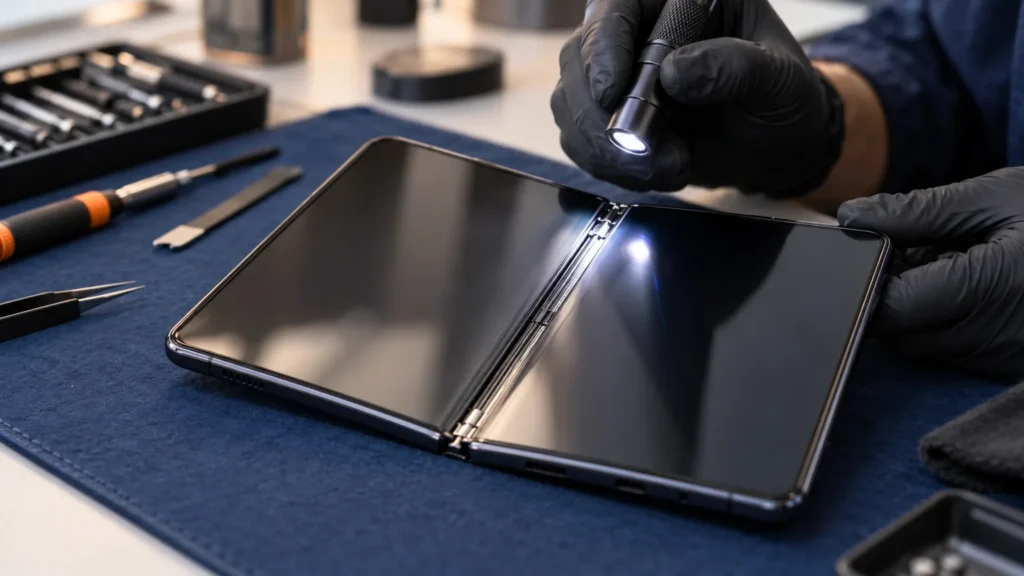
Replacing the inner display is where your own checks end. It is slow, adhesive-heavy work that needs the special fixtures in Apple’s manual (iFixit). I carry a spudger set and a precision screwdriver kit, and I would still leave this repair to Apple.
Sand, keys and other things to keep out of the fold
Look at the hinge before you open the phone, and at the inner screen before you close it. Duo owners should keep sand and grit away from the hinge, make sure it is clean before opening, and remove anything from the inner display before closing, because folding hard objects such as keys or coins inside can damage it (Apple’s iPhone handling guide).
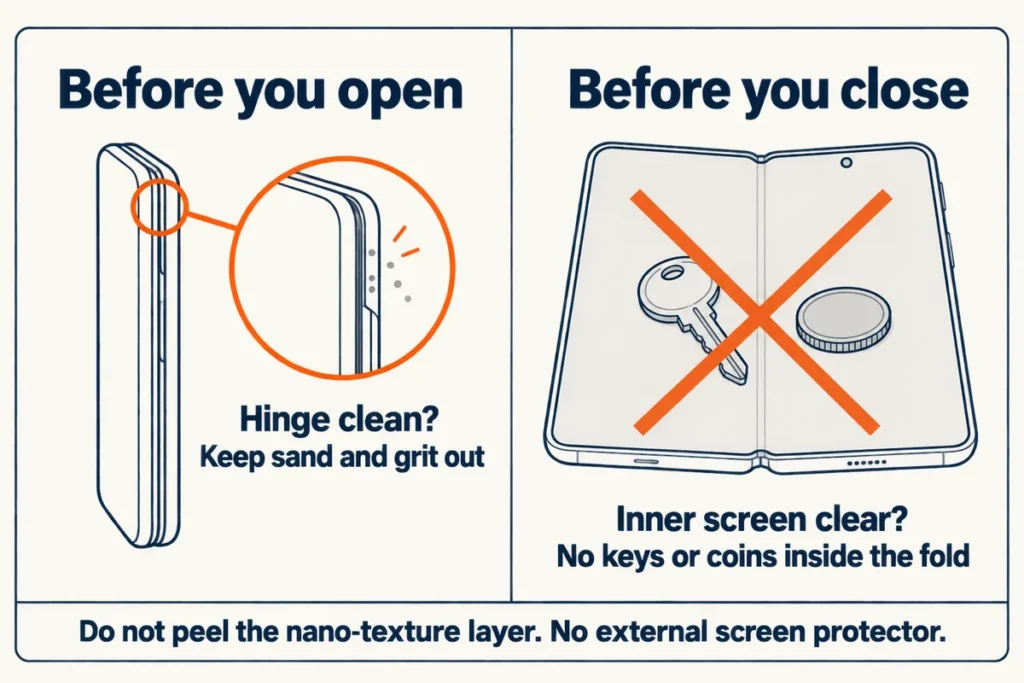
Leave the nano-texture cover layer on and skip aftermarket screen protectors. Apple says not to try to remove the layer, and that an external protector can compromise display performance (same guide).
Grit is a documented weak spot. In a fluorescent-powder test some reached the moving parts and made the hinge crunch, and IP ratings cover the enclosure, which does not seem to include a foldable’s hinge (iFixit). A durability video also found dust entering the hinge at several points despite the IP68 rating (JerryRigEverything, per Tom’s Guide).
Do not bend the hinge backwards out of curiosity unless you are ready to pay for repairs; that is AppleInsider’s advice, not an Apple instruction. In the same durability video, a bend test left a permanent green line before the inner screen stopped responding (Tom’s Guide).
The crease is not a crack
A shallow dip along the fold that you can feel but barely see is a crease, and it is normal for a foldable. No foldable has solved it completely, the Duo included (iFixit), and with the nano-texture layer on it is rarely visible in daily use (Mashable).
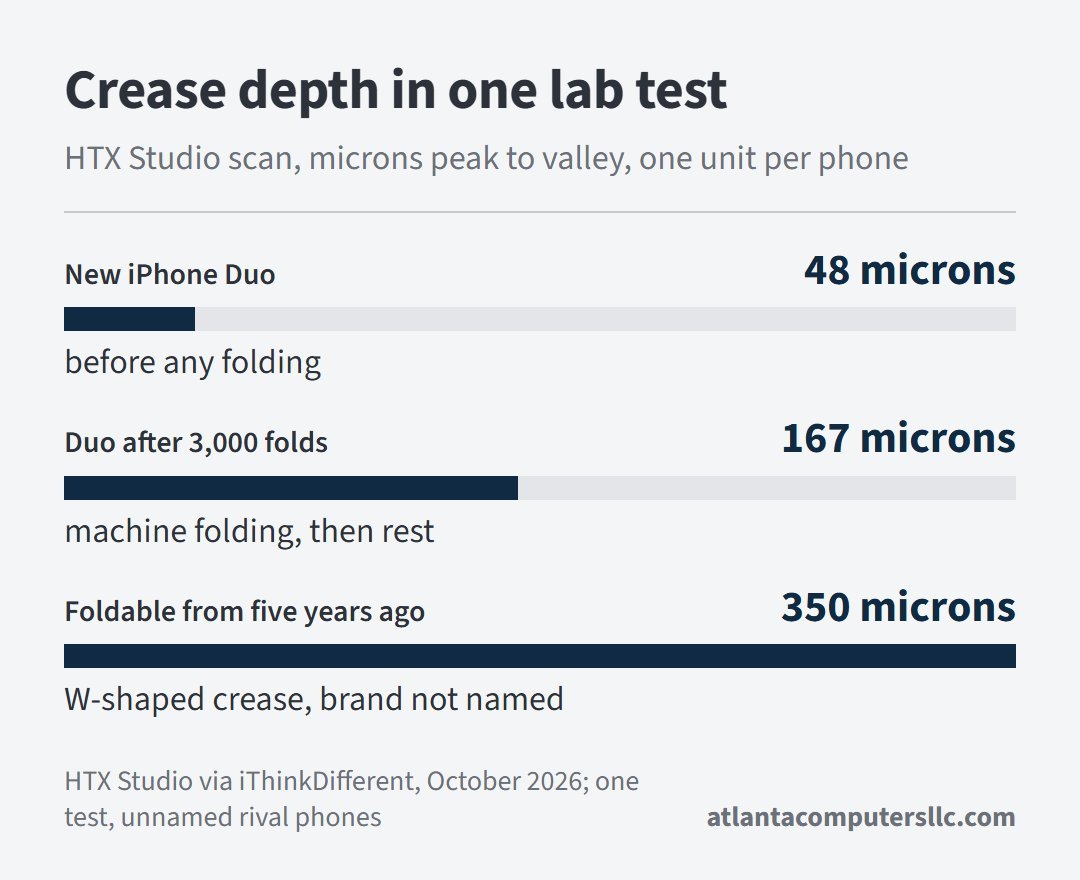
Expect it to deepen with use. In one lab test, a new Duo scanned at 48 microns peak to valley and measured 167 microns after 3,000 machine folds, about level with one unnamed rival foldable and worse than another; an older foldable in the same test measured 350 microns (HTX Studio, via iThinkDifferent).
Treat that as one test of one phone. A crease you can feel but barely see is normal foldable behavior, while a fault shows as a line of bright pixels where the screen has failed (MacRumors). Surface scratches in the cover layer are a third thing, and that layer can be replaced without replacing the OLED beneath it (iFixit). Scratch tests disagree: 6H marks showed under bright light but were too light to feel in HTX’s pencil test, and JerryRigEverything saw scratches at level 2 on the Mohs scale (Tom’s Guide). The full crease story is on our iPhone Duo crease page.
Replacement waits and carrier purchases
If you bought from a carrier, go to AppleCare, not the carrier. Carriers lack immediate replacement stock, and one owner was told they must have dropped the phone and owed the repair (9to5Mac).
Expect a wait either way. In-store replacements are available, but with limited stock some owners are waiting (MacRumors). Phone support is not always the fast route: an owner in Australia was offered an express replacement only with a hold for the phone’s full cost and no arrival date, then got an instant swap at an Apple Store (Tom’s Guide). Another r/iPhoneDuo poster got a different answer at the counter, in an update to a post about a crack inside the first 24 hours:
“UPDATE: just got back from the Apple Store and they explained they currently don’t have replacement models for the 1TB and 2TB in either colour. They have ordered one it but can’t guarantee when it will come.” [excerpt from the post’s update]
– r/iPhoneDuo, October 2026 (5,600 upvotes)
So the outcome depends on the storage size, the color and the store. Keep your receipt, and take a photo of the screen when the problem first appears so you have something to show.
Check your own return window and warranty: about two weeks to return, and a one-year warranty that should cover hinge failures from normal use (MacRumors). Carrier and store terms can differ.
Software, heat and trade-offs that are not defects
Apps and software
Update the apps first, then iOS. Third-party apps that are not yet optimized for the Duo show large black sidebars or sit slightly askew (Tom’s Guide), or appear as a small iPhone-style window in the middle of the inner display that you can resize into a larger, blurry version (Mashable). The fix is on the developer side, and at least 10 of the apps one reviewer uses had been updated since he got the phone a little over a week earlier (Mashable).
WhatsApp often got the camera orientation wrong in video calls and when scanning QR codes, though that appeared fixed by publication (Mashable).
On the 5.4-inch outer display, Safari’s right-aligned controls leave websites a narrow strip, and Apple has said it is exploring ways to let sites use that space (Apple’s Jen Simmons on the WebKit blog, reported by 9to5Mac on October 23). Left-handed owners are stuck with a dock locked to the right side for now, and Apple has promised an update in the coming months (Tom’s Guide).
As of October 27, no reliable first-hand report of a battery fault specific to the iPhone Duo has turned up in the coverage checked, so there is no battery section yet.
Heat
A warm back is expected: it is normal for an iPhone to get warm in use and while charging, and a temperature warning screen appears if the interior gets too hot (Apple’s handling guide). Reviewers did notice it. The Duo ran a few degrees hotter than the Galaxy Z Fold8 in testing but spread the heat more evenly, and one reviewer ended a FaceTime call because the back felt too hot (Tom’s Guide, citing Joanna Stern).
Design trade-offs reviewers list
These are decisions, not faults, so settle them inside the return window:
- No dedicated telephoto lens, which nearly every review remarked on (Tom’s Guide); Apple describes the 48MP Fusion Main camera as including an integrated optical-quality 2x telephoto (Apple’s announcement).
- Touch ID in the side button instead of Face ID, with a small lag in reviewers’ use (Tom’s Guide); an Apple Watch can also authenticate you (Apple’s announcement).
- A price above $2,000, reported as $100 more than the Galaxy Z Fold8 (Tom’s Guide).
- Weight of 8.96 oz (254 g) against the Fold8’s 7.09 oz (201 g) (Tom’s Guide).
Keep it, return it or wait
- Your Duo works and the hinge feels the same as on day one: nothing in these sources says to stop using it, and Apple says most users will not see the display problem (MacRumors).
- You see a bright line or a crack, or you heard a pop followed by a line: contact AppleCare, as Apple’s statement says.
- The hinge is noisy, loose, stiff or will not close: run Apple’s five checks, then go to Apple service.
- You are inside the return window and uneasy about the hinge: the window exists for that, and no one has a failure rate to help you weigh it.
Update log
- October 27, 2026: first version, with Apple’s statement, its hinge troubleshooting and handling pages, the three cause theories, the AppleInsider store check, and the carrier and stock reports.