
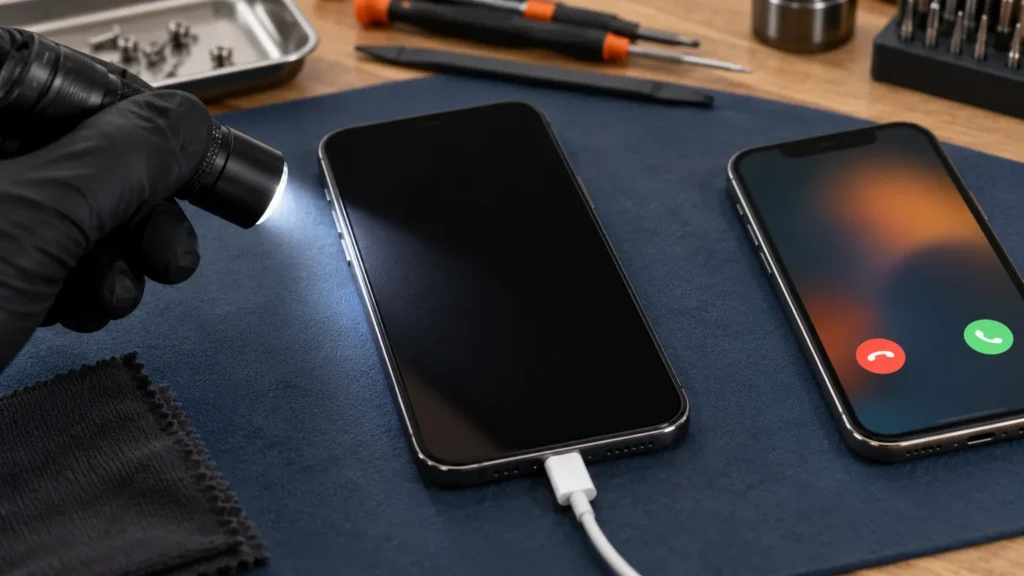
An iPhone black screen on a phone that still rings or buzzes is usually a dimmed display, VoiceOver’s screen curtain or a frozen system, and a force restart clears the last of those. If the picture stays gone after that, the display itself is the likely fault.
Whether the phone is on at all is the first thing to settle. Apple covers “won’t turn on” and “screen is black” on one support page, but they split fast: a phone that is off or flat needs power, while a phone that is on needs the steps below. A phone with no sound, no buzz and no response after an hour on a charger belongs on the iPhone won’t turn on page instead.
Tell the two kinds of black screen apart
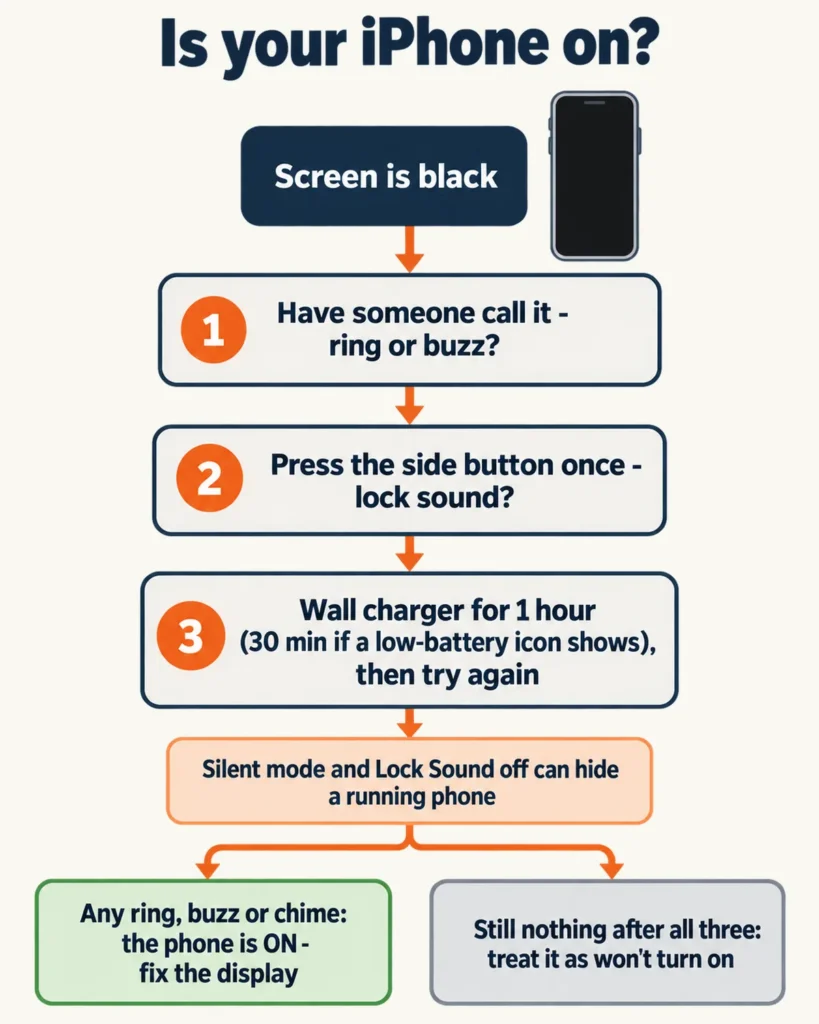
Three quick tests settle it. Have someone call the phone, press the side button once and listen for the lock sound, and put the phone on a wall charger.
No single test is conclusive. Apple’s guide says Silent mode stops the ring but the phone may still vibrate, and it lists Lock Sound as a setting you can turn off under Sounds & Haptics. A quiet phone can still be a running one.
For the charger test, Apple’s page for a black or dead iPhone says to charge for one hour and then try again, or for 30 minutes or until it starts if the phone shows a low-charge battery. If the phone never shows a charging sign on any cable, the iPhone won’t charge checks cover the cable, adapter and port.
Any buzz, chime or ring means the phone is running. The screen is the problem, and everything from here on assumes that.
Laptops split the same way: spinning fans with no picture are a different job from a machine that never powers up. Laptop owners can follow that branch in HP laptop black screen.
Dim, curtained or frozen: causes that leave the phone running
Three causes make a working iPhone look dead, and none of them needs a tool.
Brightness turned all the way down
Open Control Center without looking and push the brightness bar to the top. Apple’s brightness page says to swipe down from the top right corner on an iPhone X or later, and to swipe up from the bottom edge on an iPhone 8 or earlier. If a faint shape appears on the glass after that, the display was only dim and the slider was the whole fix.
One r/iphone reply to a phone that was on but completely black suggests a voice route instead:
““Hey Siri, turn up the brightness on my phone.” This worked for me when I wiped my screen and dimmed it all the way to black. It can’t hurt to try.”
– r/iphone, December 2025 (4 upvotes)
Apple documents the Control Center route above. The Siri request is that user’s report, and it costs nothing to try.
VoiceOver’s screen curtain
VoiceOver has a mode that turns the display black on purpose. Apple’s iPhone User Guide says that when the screen curtain is on, the screen contents are active even though the display is black and appears to be turned off.
A three-finger triple tap switches it off. If both VoiceOver and Zoom are on, the same job takes a three-finger quadruple tap. Listen for a phone that talks, because with VoiceOver running it reads out whatever you touch and ordinary taps stop behaving the way you expect.

If the gesture does nothing, ask Siri to turn VoiceOver off. The iOS 16 edition of Apple’s iPhone User Guide lists “Turn off VoiceOver” as a Siri request, and later editions may word it differently.
A frozen display
If brightness and the curtain change nothing, a software hang is the most likely cause. Calls and haptics can keep working while the screen stops drawing, which would explain a phone that buzzes with nothing to show for it. Apple’s answer to an unresponsive iPhone is a force restart, and the sequence is next.
Force restart for an iPhone black screen, by model
Apple gives a different button sequence for each generation, so match yours before you start. Apple’s page on an iPhone that won’t turn on or has a black screen supplies the sequences, and Apple’s recovery-mode page supplies the model grouping.
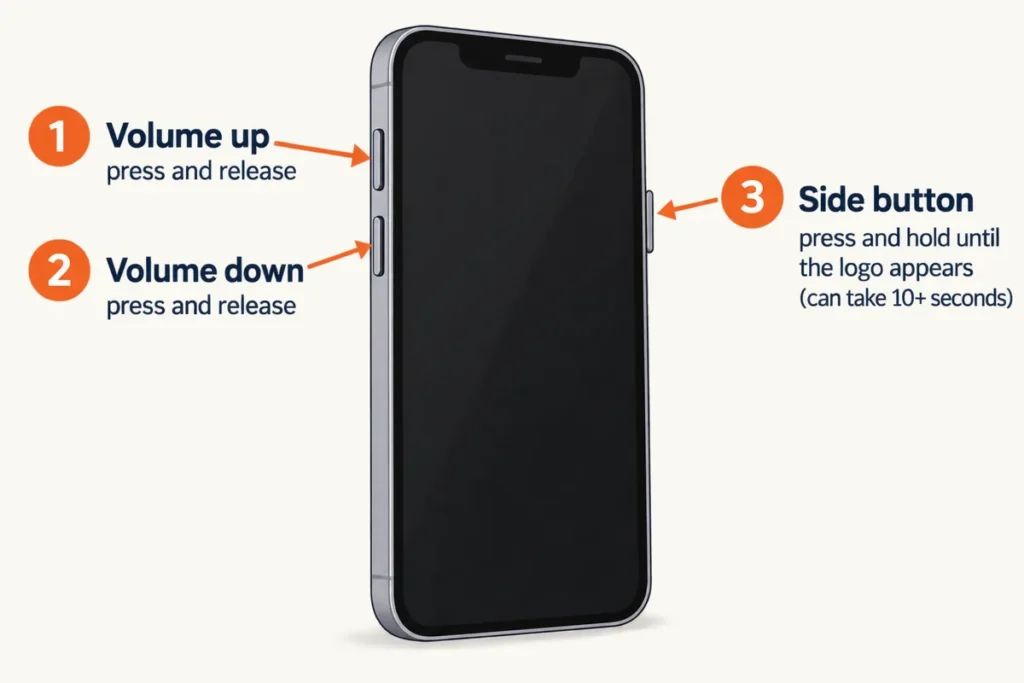
For an iPhone 8 or later, including the iPhone SE (2nd generation and later):
- Press and quickly release the volume up button.
- Press and quickly release the volume down button.
- Press and hold the side button until you see the Apple logo.
Apple notes that the logo can take longer than 10 seconds. Keep holding.
On an iPhone 7 or iPhone 7 Plus, press and hold the side button and the volume down button together until the logo appears. On an iPhone 6s or earlier, hold the Home button and the side or top button together; Apple says that takes around 10 seconds.
If nothing happens, charge the phone for an hour and try again. A force restart is a hard power cycle, and nothing in the sequence offers to erase anything.
When the picture comes back, install any pending update under Settings, General, Software Update, the path Apple’s update page gives, and make a backup that same day. If the black screen returns, skip ahead to the shop section.
Let a computer be the second screen
A black display can’t show you anything, but a computer can show whether the phone is alive. Connect the iPhone with a USB cable, then open Finder on a Mac or the Apple Devices app on a Windows PC, as Apple’s recovery-mode page describes. If the computer lists the phone, the phone itself is running and the trouble narrows to the display.
Once the phone shows in Finder or Apple Devices, back it up before anything else. Apple’s Trust This Computer page says an approved computer stays trusted, and that in iOS 16 and later the alert appears when you back up, which takes your passcode and a tap on the phone. You can’t answer a prompt you can’t see.
Before I touch a laptop’s drive I back it up or image it first, and the order is the same here: copy first, then fix. For files outside the phone, a cloud backup keeps a second copy off the device.
One r/iphone user whose display had failed, and whose repair shop would not back up the data, describes a way around the blind prompt:
“Had the same thing happen, a certified apple repair store said they would cover the costs but they wouldn’t back up my data so what I did to backup my phone is to have siri turn on voiceover so I could navigate my phone to the screen mirroring. I mirrored my phone to my macbook, at that point I was navigating my phone by looking the screen share on my macbook and just waited for icloud to backup everything”
– r/iphone, August 2026 (1 upvote)
That is one account on a thread about a white screen, and Apple does not document the screen mirroring step for this fault, so results will vary by model and iOS version. The first half is Apple’s own: its guide has Siri accepting “Turn on VoiceOver”, and VoiceOver speaks the name of each item you touch.
Recovery mode comes last. Apple lists it for phones stuck on the Apple logo or on the “Connect to computer” screen, so a phone that buzzes but stays black is a long shot for it. On an iPhone 8 or later, use the force restart buttons, except that you keep holding the side button past the Apple logo until the “Connect to computer” screen appears. You won’t see that screen, but the computer says when it finds a phone in recovery mode.
When Update or Restore appears on the computer, choose Update, because Apple states that Restore reinstalls iOS and erases all your data and says to try updating first. If the download takes more than 15 minutes, the phone may drop out of recovery mode; let the download finish, then repeat the button steps.
People call this the iPhone black screen of death. When an update finishes and the display is still black, the hardware is the likely cause.
When the display is the problem
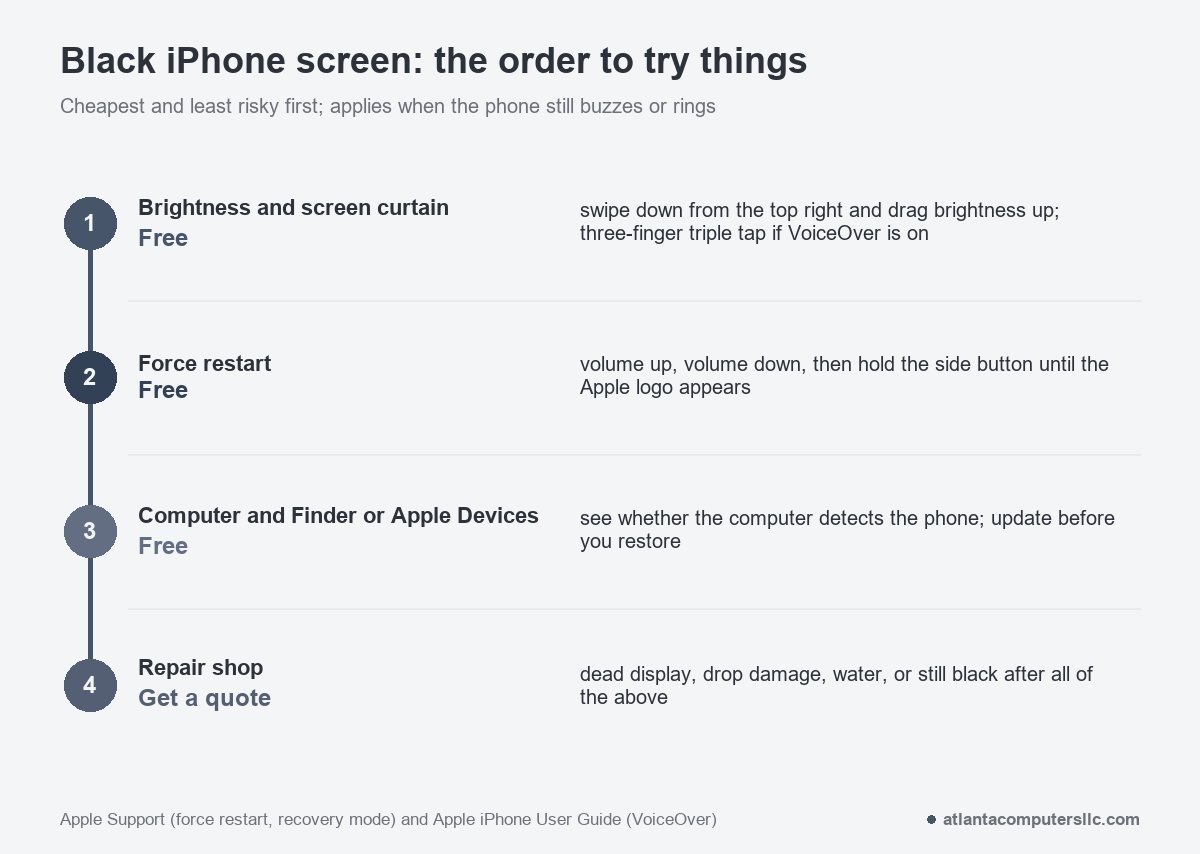
The display is the problem when the phone is running, the free steps are used up and the glass is still black. Nothing so far has cost money. Any one of these signs sends the phone to a shop instead:
- The glass is cracked or bent, or the phone was dropped before the black screen began. Apple’s safety information says not to use an iPhone with cracked glass.
- The phone was wet. Apple’s support page says servicing for liquid damage isn’t covered by the Apple One-Year Limited Warranty, though consumer law may give you other rights.
- An edge of the glass is lifting or the back is bulging. That points to a swollen battery: stop charging the phone and take it to a repair shop or a battery recycler, since Apple’s safety information says to stop using an iPhone when you suspect battery damage.
- The force restart, the computer step and an update are all done and the display is still black.
- The computer can’t see the phone at all after an hour on a wall charger.
A phone that buzzes, shows up on the computer and still has a black display most likely has a failed panel or a bad connection to it. Tell the shop what the force restart and the computer showed.
Whether a repair makes sense depends on the quote against what the phone is worth, so get a quote that names the faulty part before you agree to anything.
Board-level soldering is the one repair I send out on laptops, and phones put that same kind of work on a smaller board. If a shop blames the logic board, ask what exactly they will do and whether the repair carries a guarantee.
Three-finger taps, wet phones and repair cost
What is the three-finger trick on an iPhone?
A three-finger triple tap turns VoiceOver’s screen curtain on or off, according to Apple’s iPhone User Guide. With VoiceOver and Zoom both on, the same job takes a three-finger quadruple tap. Other features have gestures of their own.
Can water cause an iPhone black screen?
Water can be one reason, and a wet phone is a shop job. Keep it off the charger as a test. Apple’s liquid-damage page shows where each model’s liquid contact indicator sits and says it turns fully red after contact with water, so tell the shop what it shows.
How much does an iPhone black screen repair cost?
Model and failed part decide the price, so no single figure holds. Ask the shop to name the faulty part in the quote, and compare it with a second quote before you agree to the work.