
To remove a virus from a Windows laptop, disconnect it from the internet, run a full Microsoft Defender scan, run a Defender Offline scan if anything survives, and reset Windows only when the problem still won’t clear. Rule out a scam pop-up first, because no scan fixes one.
Here is how to remove virus from laptops running Windows 10 or 11, in the order I’d run the steps at the bench. Every tool below ships with Windows, so you can finish without buying anything.
How can you tell it’s a real virus and not a scam pop-up?
A real infection shows up as changes on the laptop itself: programs you don’t remember installing, a homepage or search engine that switched, files that vanished or won’t open, constant crashes. A warning that fills the browser and hands you a phone number is a scam page, and the number is the trap.
Microsoft’s support page on tech support scams is blunt: Microsoft error and warning messages never include a phone number. A pop-up with one is fake, whatever logo it wears. To look convincing, these pages go full screen, loop pop-ups, play audio and sometimes disable Task Manager. Close the browser or restart the laptop. Don’t call the number, don’t click inside the box, and don’t install anything it offers. Gift cards and cryptocurrency are never how Microsoft asks to be paid.
One person on r/computerviruses describes the version that lives on the machine itself:
“What it mainly does, apart from stealing my data, passwords, and most-likely activating my camera to see my face, is change my google search browser, and everytime I open the computer, an unclosable pop-up “anti-virus” window, that is not visible in the task bar, appears and forces me to do a scan, then it finds some files that it says are dangerous and automatically deletes them (I do not believe these files are real). Not only that, but it also does not let me open Avast free Anti-virus. Plea…” [excerpt — 510 characters in full]
– r/computerviruses, May 2026 (7 upvotes)
A window that reports its own findings can say whatever it likes. Skip its scan and use the one built into Windows, described below.
If you already phoned a number or let a stranger connect remotely, Microsoft’s steps are specific. Uninstall every app they asked you to install, run a full Windows Security scan, apply all updates and change your passwords. Consider a reset too, which is the last section here. If you paid, call your card provider and contest the charge. Read Microsoft’s guidance on tech support scams if you want the full list.
Disconnect first, then copy off what you can’t replace
Turn off Wi-Fi or unplug the Ethernet cable, then copy documents and photos to an external drive. Copy files you made yourself, not programs or installers. Cutting the connection keeps the laptop from sending anything out or pulling down more files while you work.
I back up or image a machine’s disk before I touch it. With a suspected infection I get choosier, and copy documents and photos only. Microsoft adds a caution about backups stored on the infected PC itself, which the malware may already have modified. For a later restore, an older backup or a cloud copy with version history, such as OneDrive, is the safer source.
How to remove virus from laptop with a Defender full scan
Open Windows Security from the Start menu, choose Virus & threat protection, open Scan options, select Full scan and press Scan now. Microsoft describes the full scan as covering every file and program on the device, while the quick scan is the shorter option.
On Windows 10 the same screen sits under Settings, then Update & Security, then Windows Security. The scan needs current threat definitions. If the laptop has been offline, reconnect just long enough to open Virus & threat protection updates, press Check for updates, then disconnect again before scanning.
The scan can take a long time on a large drive. Microsoft’s troubleshooting page offers three ways to help it finish: free up space on the system drive, close other programs, and restart the laptop so the scan runs before anything else opens. When it finds threats, follow the prompts to remove or quarantine them, then check Protection history to see what was done.
On the Dell, HP and Lenovo laptops that crossed my bench, I started with Defender, which is already installed and needs no download. If it finds nothing and the symptoms stay, a second-opinion scanner such as Malwarebytes is a fair next step. Download it from the vendor’s own site, and if the laptop is the problem, fetch it on another computer and move it over on a USB stick.
Run Defender Offline if the malware keeps coming back
Microsoft Defender Offline restarts the laptop and scans from the Windows Recovery Environment, before Windows loads, so malware that hides while Windows runs has a harder time. Microsoft points to it when the same malware reappears after you remove it.
Microsoft’s explanation is specific: an undetected component can quietly reinstall the malware you just removed, usually right after a restart. A full scan run from inside Windows can miss that component. Save your work first, because the laptop restarts. In Windows Security, go to Virus & threat protection, open Scan options, pick Microsoft Defender Antivirus (offline scan) and press Scan now.
The offline scan is a quick scan, and the laptop restarts on its own when it finishes. Results appear in Windows Security under Protection history, so open that screen before you decide the scan found nothing.
Use Safe Mode, then clean up programs and startup items
Safe Mode starts Windows with a limited set of files and drivers. If the laptop behaves in Safe Mode but not in normal use, the cause loads with regular Windows, and unwanted programs and startup entries are the usual suspects.
To get there, open Settings, then System, then Recovery, and press Restart now beside Advanced startup (on Windows 10 it’s under Update & Security). After the restart choose Troubleshoot, Advanced options, Startup Settings, then Restart, and pick Enable Safe Mode. Safe Mode with Networking adds the network drivers; take it only if you need the internet. An encrypted drive asks for its BitLocker recovery key here, so have it ready. If Windows keeps booting into Safe Mode afterward, press Windows key plus R, type msconfig, open the Boot tab and clear the Safe boot box.
If the first full scan never finished, run it again from Safe Mode. Then look at what launches with Windows. Right-click Start, open Task Manager, go to the Startup apps tab and disable anything unfamiliar. The same tab has an Enable button, so nothing is lost.
Next, uninstall programs you didn’t choose to install: Settings, then Apps, then Installed apps. A name that means nothing to you deserves a lookup from another device before it goes. A few apps refuse to uninstall from Settings, and Microsoft sends those to Programs and Features in Control Panel.
Clean the browser, then change your passwords
Remove any browser extension you don’t recognize, then use the reset option in the browser’s settings. Edge, Chrome and Firefox each have one, though the menu names shift between versions. A search engine that keeps switching back is its own problem, with its own fix, and a reset is only the first move on it.
Once scans come back clean, change your passwords, starting with email and banking. If you can, make the first few changes from a different device.
When a reset is the right call
Reset Windows when scans come back clean but the laptop still misbehaves, when the same malware returns after an offline scan, or when someone had remote access. Microsoft lists resetting as an option when malware has caused irreversible changes. Back up first.
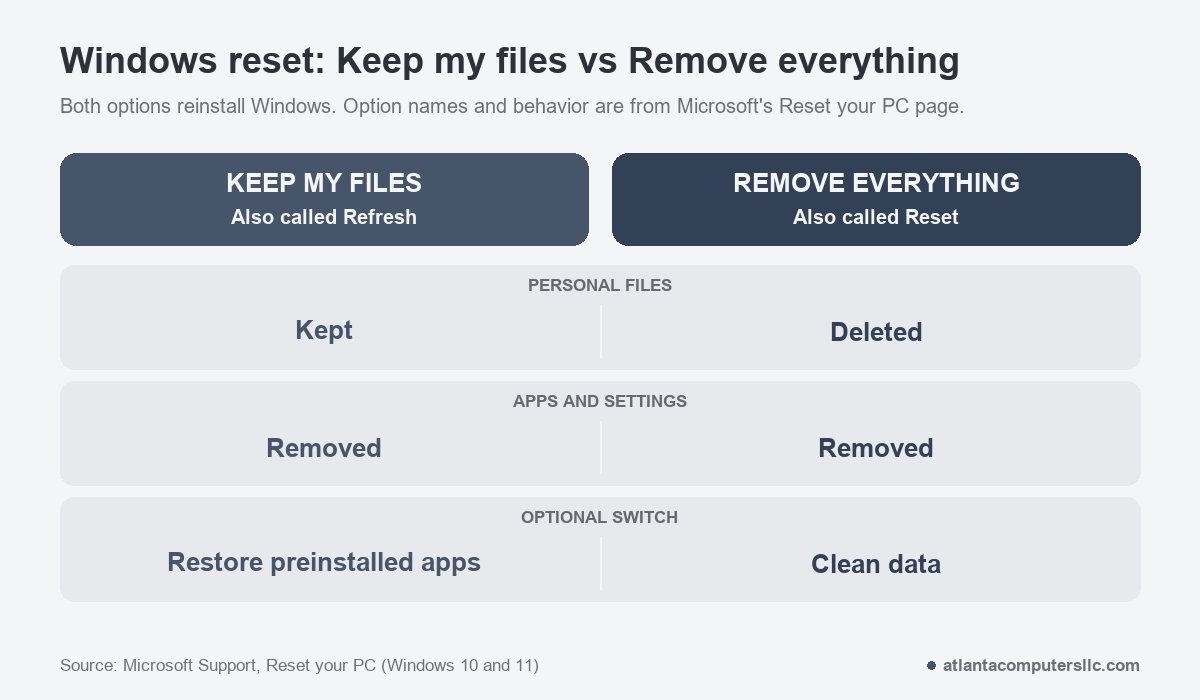
Go to Settings, then System, then Recovery, and choose Reset PC (on Windows 10, Update & Security, then Recovery). Microsoft’s Reset your PC page splits the choice in two. Keep my files reinstalls Windows and keeps your documents and photos, but removes apps and settings. Remove everything reinstalls Windows and deletes the personal files too. Keep my files leaves your own files in place, so scan them afterward.
You also pick a source. Cloud download pulls a fresh copy of Windows from the cloud, and Microsoft calls it useful when local files are corrupted or missing. Local reinstall reuses the files already on the laptop, which is faster on a slow connection but may skip the latest updates. After an infection I’d pick the cloud download, since it doesn’t rely on files that were on the machine while it was compromised. Expect the screen to go black for a long stretch, sometimes upward of 15 minutes, according to Microsoft. Don’t restart it by hand, because that can make the reset fail.
A reset from Settings isn’t the only way back. Microsoft’s recovery environment page also covers building Windows installation media on a working PC and booting the laptop from it. I keep a USB recovery stick for machines that won’t reach Windows at all.
When Windows is back, run Windows Update before restoring anything. Restore files from a backup made before the infection, not one that sat on the laptop while it was infected. Windows 10 matters here too, since Microsoft ended support for it on October 14, 2025 and no longer ships free security fixes. A laptop that was infected on Windows 10 is a reasonable moment to plan the move to Windows 11.
Stop and take it to a shop if
- A message demands payment to give your files back, or your documents won’t open at all. Shut the laptop down.
- Windows Security won’t open or keeps turning itself off.
- It’s a work laptop. Your IT department needs to hear about it before anyone cleans anything.
- A reset fails or the infection returns after one. A failing drive can cause some of the same symptoms, and I send readers with a clicking drive to a data recovery lab, not a repair bench.
- A caller got remote access and you paid. Follow Microsoft’s steps above, then have the laptop checked.
Frequently asked questions
Can you remove a virus from a laptop for free?
Use what Windows already includes: a full scan in Windows Security, then the Microsoft Defender Offline scan if the problem returns. Both come with Windows 10 and 11, and neither needs a purchase.
How do I delete a virus that won’t delete?
Run the Microsoft Defender Offline scan, which works outside Windows. If the file survives, scan again from Safe Mode, and reset Windows if it keeps coming back.
Does resetting the laptop remove a virus?
A reset reinstalls Windows and removes installed apps and settings, and Microsoft lists it as an option when malware has caused irreversible changes. With Keep my files your documents stay, so scan them afterward.
What if it’s a Mac?
macOS includes built-in antivirus called XProtect, which Apple says moves known malware to the Trash and removes infections when it receives updated information. Install the latest macOS update, then move apps you don’t recognize from the Applications folder to the Trash and empty it. Windows tools above don’t apply.