

A small business cybersecurity checklist fits on one page: turn on multifactor authentication, use a password manager, switch on automatic updates, run endpoint protection, keep tested 3-2-1 backups, lock down the router, train staff on phishing, remove access when people leave, and write down who to call after an incident.
CISA, the FTC and NIST each publish a version of that list for small businesses, and the versions overlap heavily. The agencies are named in the section that uses them.
Who owns a small business cybersecurity checklist when nobody works in IT
One named person owns it, and that person doesn’t have to be technical. CISA’s guidance for small businesses says the person running the security program needn’t be a security expert or even an IT professional, but should report progress and roadblocks to the owner at least monthly.
That is the situation most small offices are in. A poster in r/cybersecurity_help put it this way:
“i run a small office with about ten laptops, and since we do not have a dedicated IT department, managing cybersecurity has fallen entirely on me. right now we are using a messy combination of free built in tools, standalone password managers, and random VPNs, but it feels really unorganized and hard to monitor. i am looking for the best antivirus for small business operations that can centralize everything without making daily management a headache. for those of you managing small teams withou…” [excerpt — 1,320 characters in full]
– r/cybersecurity_help, August 2026 (6 upvotes)
Name the owner first, then work through the nine checks. CISA’s Secure Your Business page ranks four practices ahead of the rest (phishing training, strong passwords, multifactor authentication and software updates) and adds logging, backups and encryption as the next three. Checks 1, 2, 3 and 7 cover the first four, and check 5 covers backups.
The list covers ordinary business use. A business in a regulated field answers to extra rules. FINRA, for example, publishes its own small firm cybersecurity checklist for member firms, so treat the nine checks as a floor and not a rulebook.
1. Accounts and MFA
Turn on multifactor authentication for every account that offers it, starting with email and anything that holds money or customer records. CISA’s Cyber Essentials page says to begin with administrator, privileged and remote-access users, and to give each person only the access the job needs.
Any form of MFA beats none, in CISA’s words. Codes by text message or an authenticator app raise the cost of an attack. CISA adds that the only widely available phishing-resistant option is FIDO sign-in, which refuses to work on a fake login page, and that FIDO is already built into the browsers and smartphones most staff use. NIST’s small business basics page asks for phishing-resistant MFA where an account offers it.
Proof: open your business email in a private browser window and sign in. It should ask for a second step. Then look at the admin console of your email or file-sharing service for any user with MFA off. CISA tells IT leads to verify MFA rather than assume staff enrolled, because new hires and people who changed phones are where the gaps appear.
2. Passwords and a password manager
Use a password manager and let it generate a different password for every account. The FTC’s small business cybersecurity guidance sets the floor at 12 characters, while CISA’s Secure Our World campaign asks for 16. A manager types the password, so the longer figure costs a team nothing.
Neither agency wants a clever password. The FTC suggests a passphrase made of random words, says never to reuse a password, and says never to share one by phone, text or email. It also recommends limiting failed login attempts so a guessing program gives up. NIST’s basics page adds a quieter item: change the default manufacturer password on anything that shipped with one, which usually means routers, printers and cameras.
CISA notes that some password managers are free, such as the one built into a web browser, and some cost money. The choice matters less than having every account in one.
Proof: pick three accounts at random, say email, the bank and the accounting software. In the manager, confirm each one is unique and long. CISA points out that managers flag weak and re-used passwords, so run that report and fix whatever it lists.
3. Updates, and a list of what you own
Turn on automatic updates for every operating system, browser and business application, and keep a written list of the computers, phones and software the business uses. CISA’s Cyber Essentials page asks for both, plus removing hardware and software that no longer receives support.
A spreadsheet is enough for the list. Columns for device, owner, operating system and the date you last confirmed it updates will do. You can’t patch a machine nobody remembers. The FTC adds the router: update its software, and either sign up for the maker’s email alerts or put a recurring reminder in the calendar. When a computer is too old to take updates, replacing it is the fix, and five things to know before buying a new computer covers what to weigh.
Proof: open the update screen on three machines. Each should say it’s current, and automatic updates should show as on. Any device that can’t update goes on a replace list with a date.
4. Endpoint protection on every laptop and desktop
Run current antivirus or endpoint protection on every computer, keep it updated, and take administrator rights away from everyday accounts. NIST’s basics list says to install and maintain updated antivirus software, and CISA tells small businesses to remove administrator privileges from user laptops.
The administrator point matters because of how many attacks begin. CISA describes a common route as tricking a user into running malicious software, and a user without administrator rights can’t install it. Encryption belongs here too. CISA notes that Windows and Mac laptops have to be configured to encrypt their drives, and the FTC recommends full-disk encryption so a lost or stolen laptop doesn’t hand over its data. I won’t name products here. Speed is the usual complaint about security software, and virus protection that doesn’t slow your computer down covers choosing protection that stays out of the way.
Proof: on each computer, open the security app and confirm it reports protected with a recent update. Then look in the account settings to see whether the daily account is listed as an administrator. If it is, create a separate standard account for daily work and keep the administrator one for installs.
5. Backups: 3-2-1, then the restore test
Keep three copies of important files on two kinds of storage, with one copy off-site and at least one out of reach of the network. CISA states the 3-2-1 rule that way for small and medium businesses, and the FTC adds that backups should sit on a drive or server off the network. If one copy lives on a NAS with several drives, the RAID calculator shows how much usable space a layout leaves; the RAID array is still only one copy.

CISA’s backup page lists what to protect first: customer and client records, employee and payroll data, financial data, email, configuration files and website databases. It says to choose a backup that runs on its own, and to keep protections on the backups themselves, including encryption and offline copies. The FTC says the same drive or server shouldn’t be connected to the network, so ransomware that reaches the network can’t reach the backup.
The backup page also cites Verizon’s 2025 Data Breach Investigations Report, in which ransomware figured in 44% of the breaches Verizon investigated. That’s Verizon’s caseload and not a count of every small business. CISA’s separate guidance for small businesses says many ransomware victims had no backups or damaged ones, and some found that restoring took far longer than they expected.
I make a copy of a drive before any repair that touches it, and the same habit applies to a business. A backup nobody has restored from is still a guess. CISA’s page names three tests, and here is how I’d run them. For the cloud copy, unlimited data backup to the cloud goes into the options.
- Partial restore. Delete a test file, then restore it from the backup. This takes minutes.
- Roll-back of at least seven days. CISA says you should be able to go back that far. Restore an older version of a document and confirm it’s last week’s.
- Full restore. Rebuild a spare computer or folder tree from the backup alone, with no internet if possible, since CISA also says to know how to reach critical files offline. Book a quiet afternoon for this one.
Proof: write down the date each drill passed and how long the full restore took. If the full restore takes a day, the business can be down for a day, and now someone knows it.
6. Wi-Fi and the router
Change the router’s default username and password, turn off remote management, use WPA2 or WPA3 encryption, and put guests on a separate network. Those steps come straight from the FTC’s small business guidance, which also says to log out of the router’s admin account when you finish.
The FTC wants the main business network limited to devices the business owns or manages. Visitors, staff phones and the public go on a separate guest network, set up from the router’s admin portal. Give the business network its own strong password. The same page recommends locking paper files and devices that hold sensitive information in a cabinet or room, with access limited to the people who need it.
Proof: sign in to the router’s admin page from inside the office. The address and steps are in its manual. Confirm the login isn’t the factory one, remote management is off, and the encryption setting reads WPA2 or WPA3. Then look at the Wi-Fi list on a phone: the guest network should have its own name and password.
7. Phishing and payment-change requests
Train staff to spot phishing, give them one easy way to report it, and require a phone call to a known number before anyone changes payment details or sends a wire. The FTC recommends both the training and the call-back rule, and CISA lists phishing training among its first four practices.
CISA’s Secure Our World pages name the signs: urgent or emotional language, requests for personal or financial information, shortened links and addresses that are slightly off, like amazan.com. They also warn that poor grammar is no longer a dependable sign, because AI-written messages can read perfectly. Business email compromise is the costly version. CISA’s Secure Your Business page cites the FBI reporting over $2.7 billion in business email compromise losses in 2024, across businesses of every size.
The FTC suggests phishing simulations to see how staff respond. If the business email uses the company’s own domain, ask the email provider whether it supports SPF, DKIM and DMARC, the three tools that make it harder for scammers to send mail that looks like yours. The same FTC page says an unexpected call claiming your computer has a problem is likely a scam. Hang up, and call a technician you chose.
Proof: ask the newest employee what they’d do with an unexpected invoice that asks to change bank details. The right answer is a call to a number already on file. Then forward a harmless suspicious message to the reporting address and see that someone acts on it.
8. Offboarding: pull access the day someone leaves
Remove a departing employee’s access the same day: disable their accounts, collect their devices, change any password they knew, and remove their phone and other MFA methods from every account they could reach. CISA’s Cyber Essentials page only says to have procedures for changes in user status, so the steps here are mine.
- Email and cloud accounts. Disable them first instead of deleting, so mail and files stay reachable for whoever takes over the work.
- Shared logins. Change the Wi-Fi password and any shared tool password the person knew.
- Devices. Collect laptops and phones. The FTC says to use a factory reset or erasing software on a device you no longer need, since deleting files alone doesn’t remove them completely.
- Outside portals. Bank, payment tools, vendor accounts and the website admin each need the same review.
Vendors and contractors follow the same logic. The FTC recommends giving a vendor access only for the time the job needs, and CISA’s Cyber Essentials page lists vendors and business partners among the network connections to keep a list of.
Proof: pull the user list from your email or file-sharing admin console and set it beside the payroll list. Every name that isn’t on payroll needs a reason to be there.
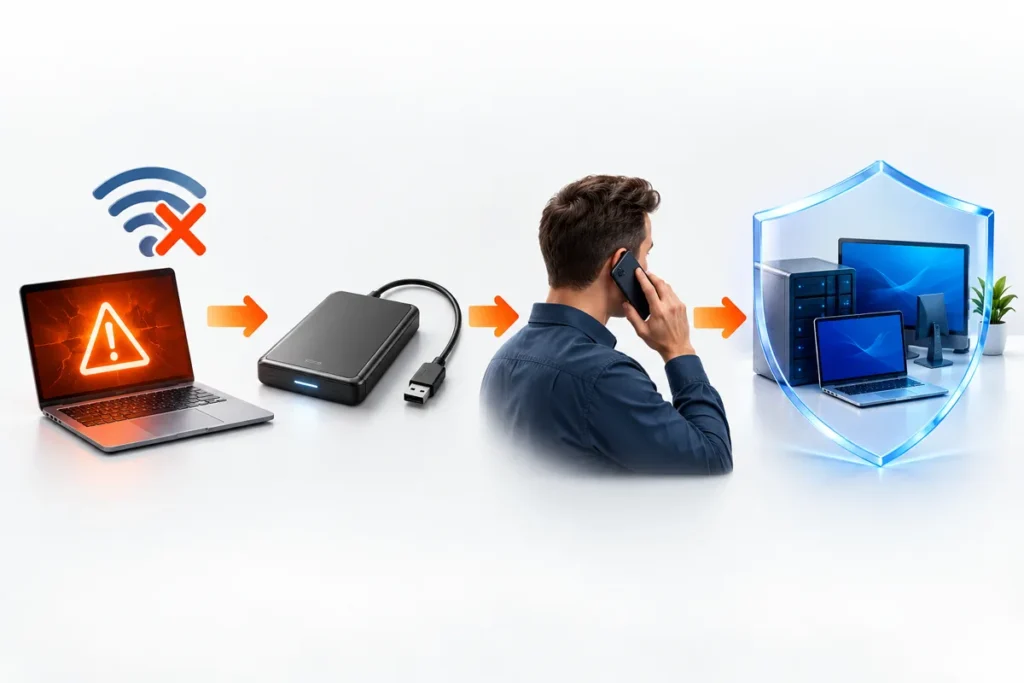
9. The first hour after something goes wrong
Disconnect the affected computer from the network without powering it down, then call the people on a printed contact sheet. The FTC says to disconnect infected devices right away and not shut them down, because information useful to an investigation can be lost when a device powers off.
Disconnecting means unplugging the ethernet cable or turning off the computer’s Wi-Fi. Then work the contact sheet. CISA’s incident plan guidance calls for roles and an address book that still works when the network is down, so keep a paper copy: your IT or repair technician, your bank, your insurer if you carry cyber cover, a lawyer, and law enforcement.
On the reporting side, the FTC says to contact your local FBI office about a ransomware attack, NIST’s incident page points to the FBI’s Internet Crime Complaint Center at IC3.gov, and CISA takes reports at cisa.gov/report. The FTC also notes that law enforcement doesn’t recommend paying a ransom and that paying doesn’t guarantee the data comes back, which is the point at which a restorable backup earns its keep. If customer data was exposed, the FTC’s Data Breach Response guide covers notifying them. A single laptop that’s only acting strangely is a repair job, and how to remove a virus from a laptop walks through it. Once staff share files with that laptop, treat it as an incident.
Proof: print one page with the contact list and the first three actions, then ask someone to find it without opening a computer. CISA says to review the incident plan quarterly and after any near miss, so put that date in the calendar.
Questions that come up
How do I start a small business cybersecurity checklist with no IT staff and no budget?
Start with the four practices CISA lists first: phishing training, strong passwords, multifactor authentication and software updates. None needs new equipment, and CISA notes that a web browser’s built-in password manager is free.
Where do the official versions of the list live?
CISA publishes Cyber Essentials, the FTC publishes Cybersecurity for Small Business, and NIST runs the Small Business Cybersecurity Corner. NIST’s Cybersecurity Basics page lists nine steps, from phishing-resistant MFA to tested backups, and links to its Cybersecurity Framework 2.0 Small Business Quick Start Guide.
How often should the checks be repeated?
Review them quarterly. CISA has the incident plan reviewed every quarter and after any near miss, and NIST calls cybersecurity a continuous process, so a quarterly slot for the restore test and the account audit fits the same rhythm.